
The Confido Change Log
product changelog.


Change Log - Week of September 7, 2026
Forecasting & Demand Planning
1. Seasonal forecasts for newer products - Forecasts now pick up a product's seasonal pattern from as little as one year of sales history, so newer products get curves that follow their real highs and lows through the year. This is on for everyone automatically.
2. See whether your demand plan has the latest sales forecast - Your demand plan now shows how fresh its sales forecast is. An indicator on the plan shows exactly what the last sync brought in and whether anything is still waiting to be synced.
3. Forecast alerts name the exact warehouse - Forecast alerts now point at the specific distribution center where forecast and reality are drifting apart, so you know exactly where to look. Firing at the most specific level also surfaces problems that used to cancel out inside a broad group.
4. Plan for shrinking sales in Scenarios - Scenarios now accept negative growth rates, so you can model a declining business the same way you model growth, and the decline carries through to the forecast.
5. Group scenario products your way - Scenario Builder now groups the product table by any product attribute you have set up, like pack size or category, with headers you can expand and collapse, matching how the base forecast works.
Supply Planning
1. Record shipments and receipts without an ERP - You can now upload shipments and receipts directly from a spreadsheet on the data ingestion page, so companies without a connected ERP get complete shipping, receiving, demand, and inventory numbers in Confido. A corrected upload cleanly replaces the earlier one, and orders close on their own once everything on them has shipped.
2. Change or cancel purchase requisitions yourself - Purchase requisitions can now be edited and cancelled directly in the supply planning workspace, so the plan stays in your hands end to end.
3. Control how far ahead safety stock looks - You can now set how far ahead Confido looks at demand when working out days or weeks of inventory on hand, so inventory targets match how far out your business actually plans.
4. Set inventory targets in fractions of a week - Weeks-on-hand targets now accept decimals, so a fast-turning or short shelf-life product can carry a target like 0.9 weeks instead of rounding up to a full week. Suggested orders follow the tighter target.
TPM
1. Manage everything by brand - Every product can now carry a brand, set from a dropdown and managed in the same place as product families. Promo Performance, Accrual Management, and Deductions all filter by brand, offer a brand column, and match brand names in search, so multi-brand teams can plan and reconcile one brand at a time without exporting to Excel.
2. Update hundreds of promotions at once with Fido - Fido can now make one change across up to 500 promotions at a time: updating details like buy-in dates, scanback days, accrual periods, or currency, lining buy-in dates up with event dates, or shifting them all by a set number of days. It shows exactly what will change before anything is saved.
3. Promotions split consistently however they are created - Promotions now split by financial period the same way whether they are built in the app, uploaded in bulk, or created by Fido, so accrual tracking lines up across all three.
Deductions & Cash Application
1. Choose where cleared deductions post, by reason - You can now route cleared deductions to different accounts in your books based on the deduction reason: set rules like damages post to this account and spoilage posts to that one, and optionally require a reason before anything can be cleared. The check page shows the reason and the exact account each deduction will post to.
2. Split billback deductions - Billback deductions can now be split into pieces so each part can be handled separately, the same way other deductions can. Split saves are protected so amounts always stay in balance.
3. Credit memos from Business Central work in Confido - Confido now reads credit memo amounts and status directly from Microsoft Business Central, so those credit memos show up when you apply cash and can be used like any other.
Disputes
1. Dispute Walmart deductions that have no claim - Walmart deductions that arrive without a claim behind them can now be disputed against the invoice, with clear guidance on filing, so those dollars can be worked like any other dispute.
2. Dispute timeline shows exactly what has been sent - The dispute timeline now shows each dispute's real send status: a waiting-to-send step with its own date, a submission marked only once it has actually gone out to the retailer, and a clear explanation if a send fails.
3. H-E-B dispute replies update your disputes automatically - When H-E-B answers a dispute by email, Confido now matches the reply to the right dispute and updates its status automatically, so your dispute list reflects H-E-B's answers without anyone watching an inbox.
Platform
1. Retailer portal accounts set up automatically - When an invitation email from Costco, Target, or H-E-B arrives, Confido now sets up the retailer portal account on its own, and Walmart logins are captured automatically along the way. This is on for everyone, so new portal connections come online with less waiting and no back and forth.
2. Set unit conversions during product upload - The product upload template now takes each product's unit conversion quantity as a column, so reporting in your common unit, like ounces or cases, works from the moment the upload finishes.
Change Log - Week of August 17, 2026
Forecasting & Demand Planning
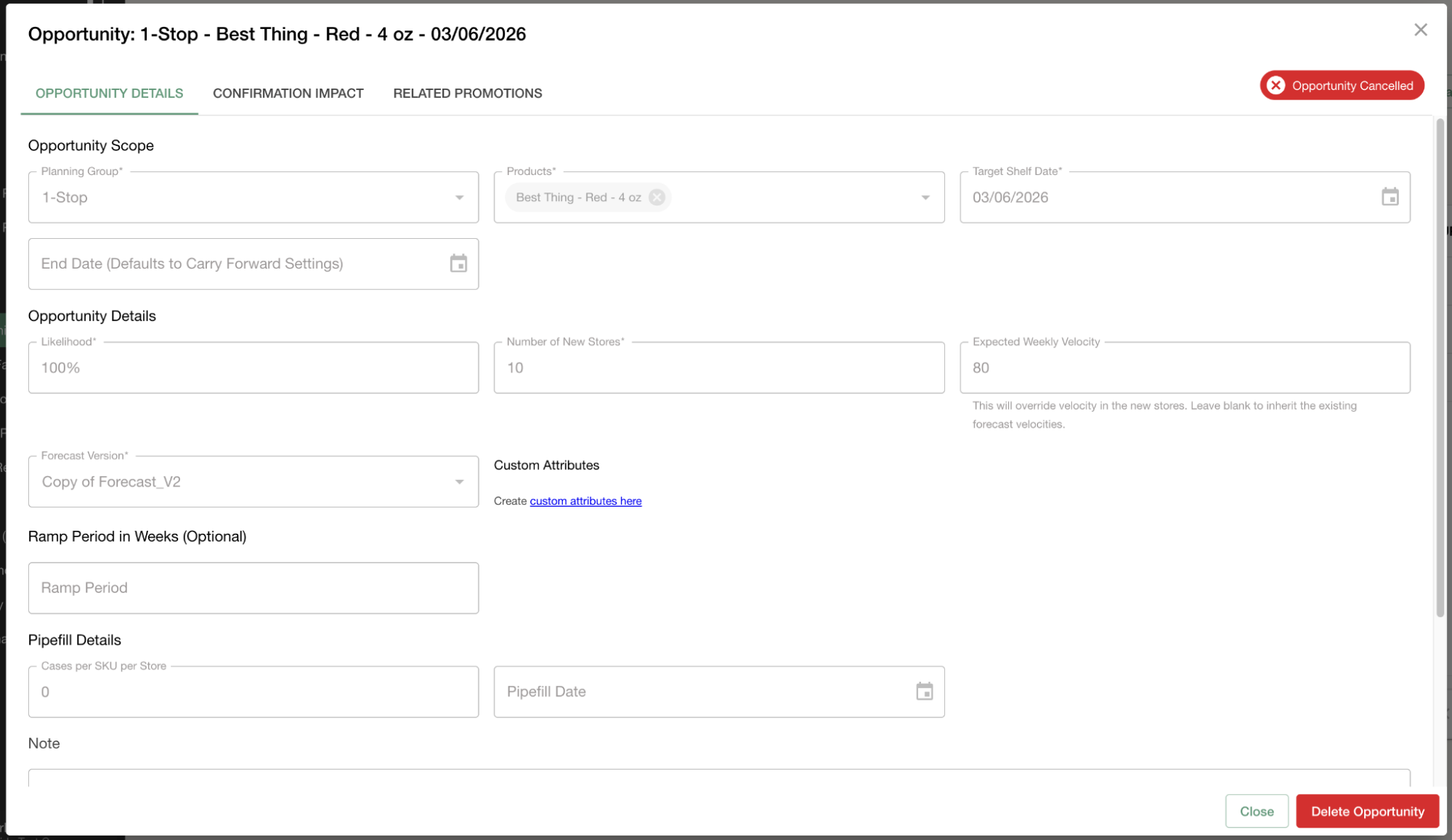
1. Delete canceled opportunities - Canceled opportunities lingered in the list with no way to remove them. Canceled opportunities can now be deleted directly from the opportunities table.
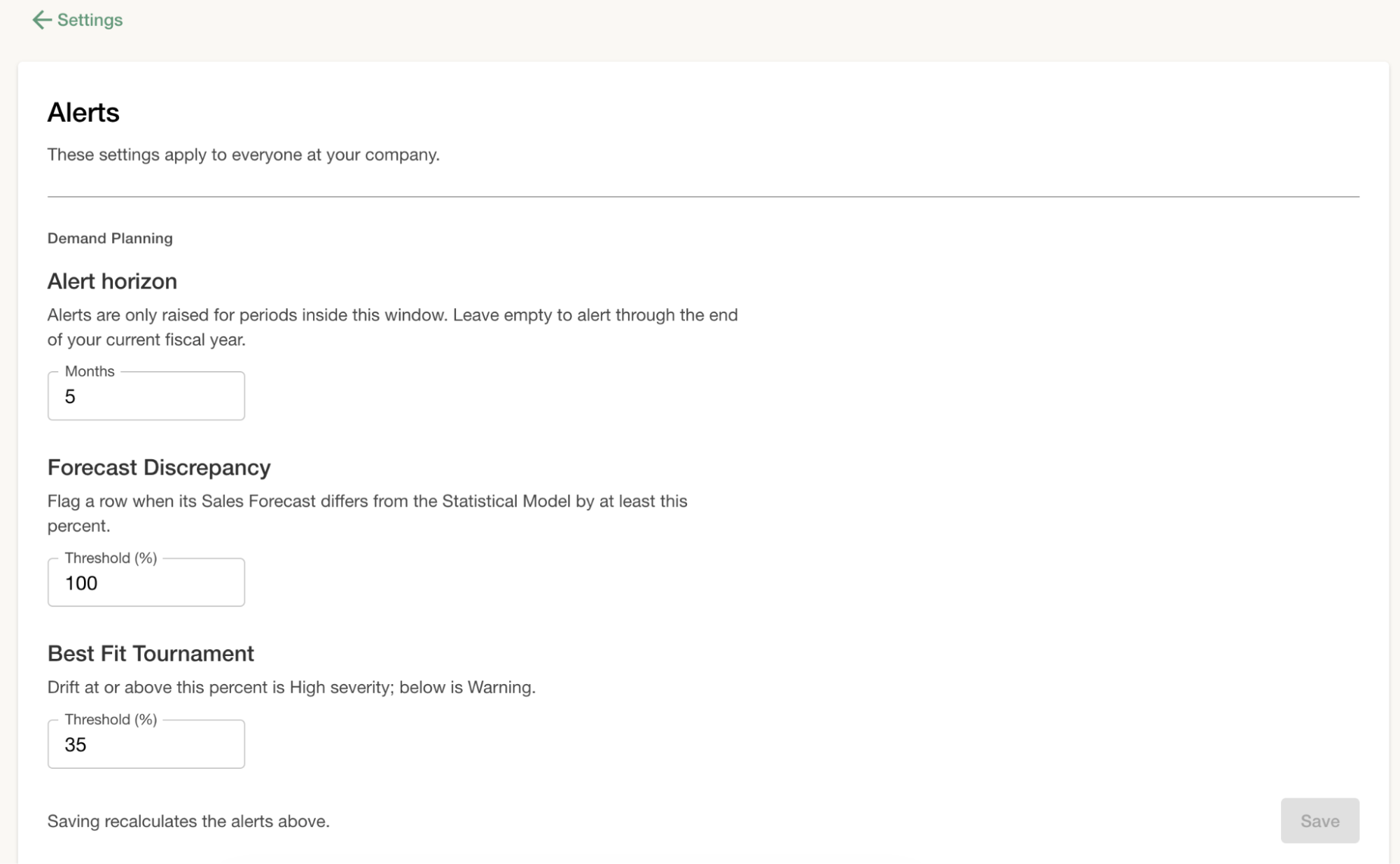
2. Choose how far ahead alerts look - Alerts kept firing for periods far in the future that teams had not finished planning, which turned them into noise. A new alert horizon control on the alerts settings page lets you cap how many periods ahead forecast discrepancy and inventory alerts fire, labeled in your own weekly or monthly cadence.
3. Bulk alert triage with consolidated filters and grouping - Alerts had to be handled one at a time, and filtering controls were scattered across the page. You can now select alerts with row checkboxes or select all matching, then apply or dismiss the whole selection in one confirmed step, with filters in a single badged modal and grouping by type, module, or severity.
4. Match forecast uploads by internal item number - Forecast and adjustment uploads matched products by description alone, so two products sharing a description could silently load numbers onto the wrong one. Upload templates now accept an optional internal item number that takes priority, and ambiguous rows are flagged instead of guessed.
5. Uploads no longer hang on Initializing - When a forecast or adjustment upload failed quickly, the screen sat on Initializing for half an hour and then flipped to Stale with no error shown. Upload status is now tracked so results and errors are recovered immediately.
6. Inventory at unmapped DCs now shows up correctly - Inventory at distribution centers a brand had not explicitly mapped was silently dropped, which could read as zero on-hand inventory. That inventory now rolls into the customer's All Other DCs bucket.
7. Inventory alerts work with manual uploads and respond to threshold changes - Inventory alerts and suggested orders only ran when a reading landed in exactly the last completed period, silently skipping customers who upload inventory manually, and saving new weeks-on-hand thresholds never re-ran detection. Both are fixed.
8. Alerts open in the workspace even without a matching node - When a discrepancy alert spanned more than one top-level node in the planning hierarchy, the View in workspace button simply disabled itself. The button now opens the workspace at exactly the scope the alert measured.
9. Monthly rollups stop leaking across month boundaries - When an actualized week straddled a month boundary, its value was split between the two months by day count, so invoice-backed actuals could leak into the wrong month. Invoices are now placed in the month of their actual invoice date, and all rollup cells reconcile to the weekly detail.
10. Opportunity forecasts update when store counts are edited - Editing the store count on an opportunity did not update its pipefill forecast, so the forecast could keep the old value and show inflated numbers. Store edits now recompute the pipefill like other opportunity edits do.
11. Much faster Demand Planning workspace loads - Opening the workspace on a cold cache was measured taking almost 6 seconds. The slow reads behind it are now prewarmed nightly and served from a faster cache tier, with test loads coming back in roughly 1 second or less.
Supply Planning
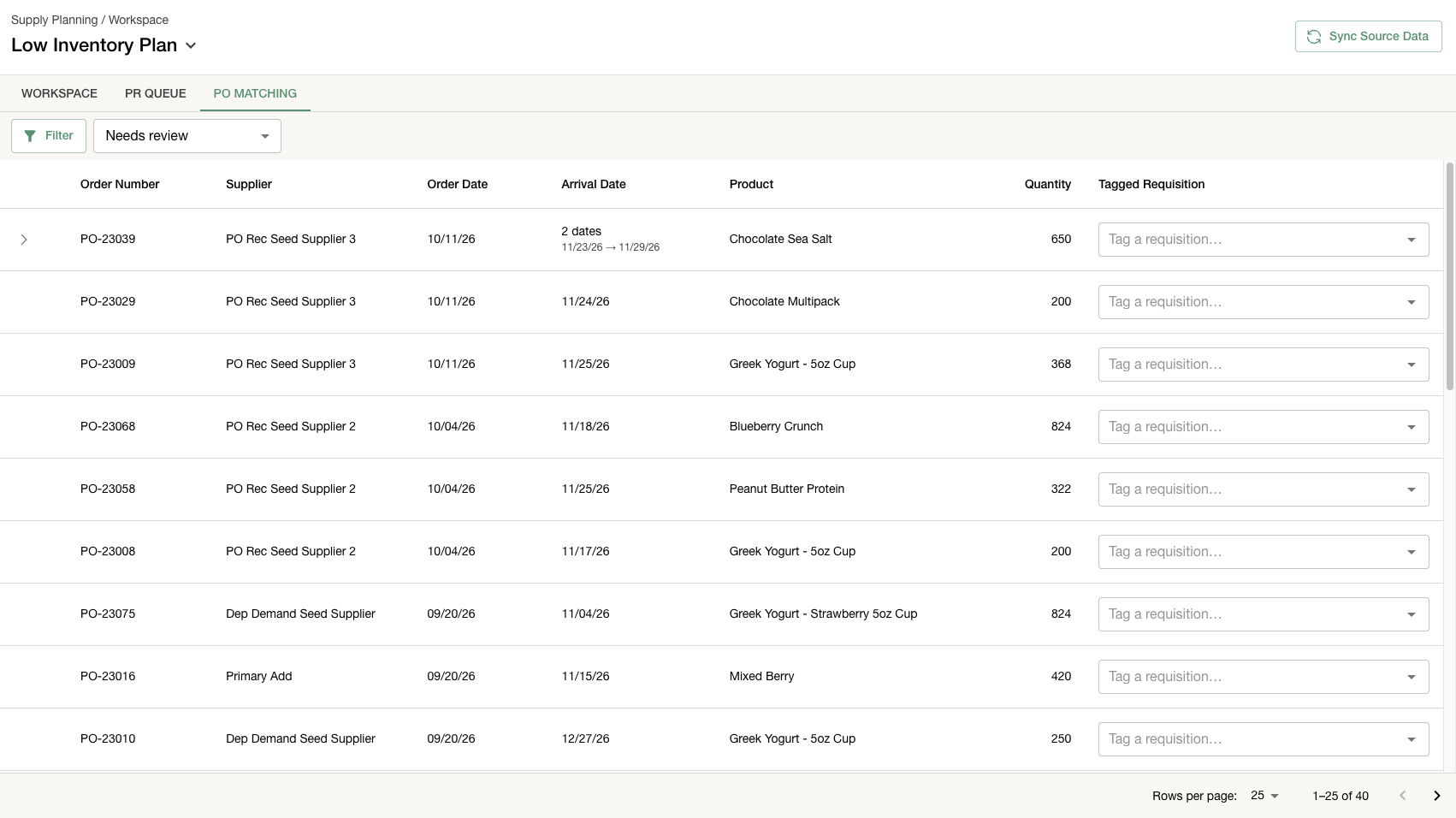
1. PO Matching: stop double counting requisitions and purchase orders - When a purchase requisition turned into a real ERP purchase order, the plan counted both as inbound supply, inflating what looked like incoming inventory. A new PO Matching tab lets planners tag each synced purchase order with the requisition it fulfills, with ranked suggestions, search, dismiss, and undo.
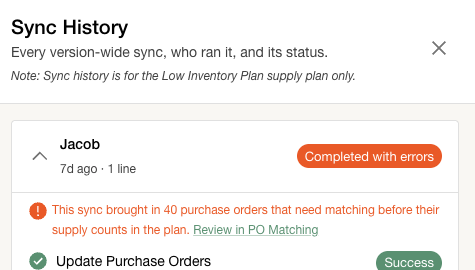
2. Warning for duplicate supply on sync - Synced purchase orders could quietly double-count supply the plan already carried from purchase requests. The sync panel now warns when incoming POs look like they are already counted.
3. Phase-out products stop getting purchase order recommendations - Products being wound down still received purchase order recommendations. The recommendation engine now skips phase-out products, clears any recommendations they already had, and labels those products in the workspace.
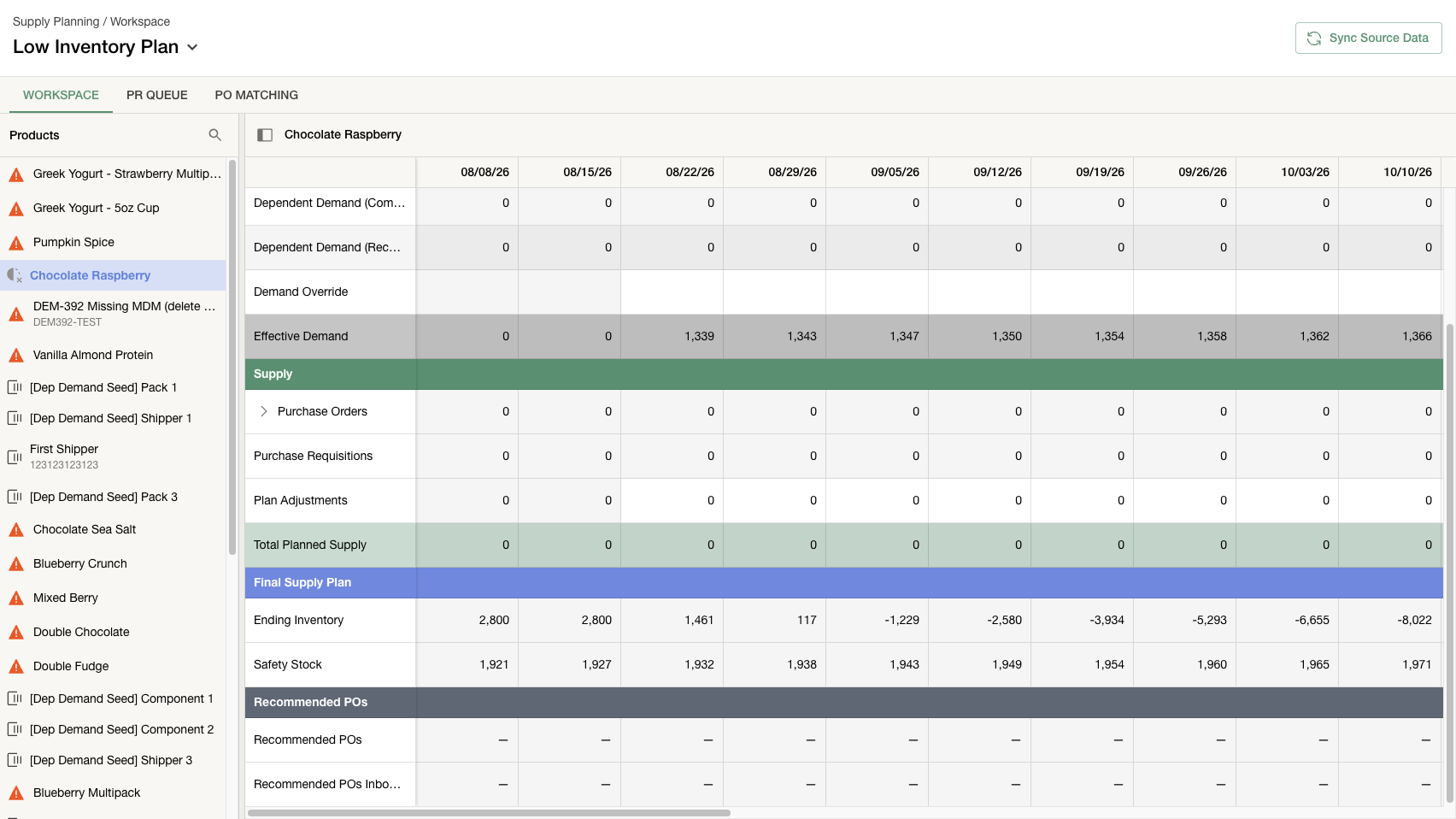
4. Search, filter, and sort for fulfillments and receipts - Fulfillments and receipts on the Data Ingestion page were plain paginated lists, so finding a specific record meant paging through everything. Both tabs now have the same search box, warehouse, product, and date filters, and sort options the order tabs already had.
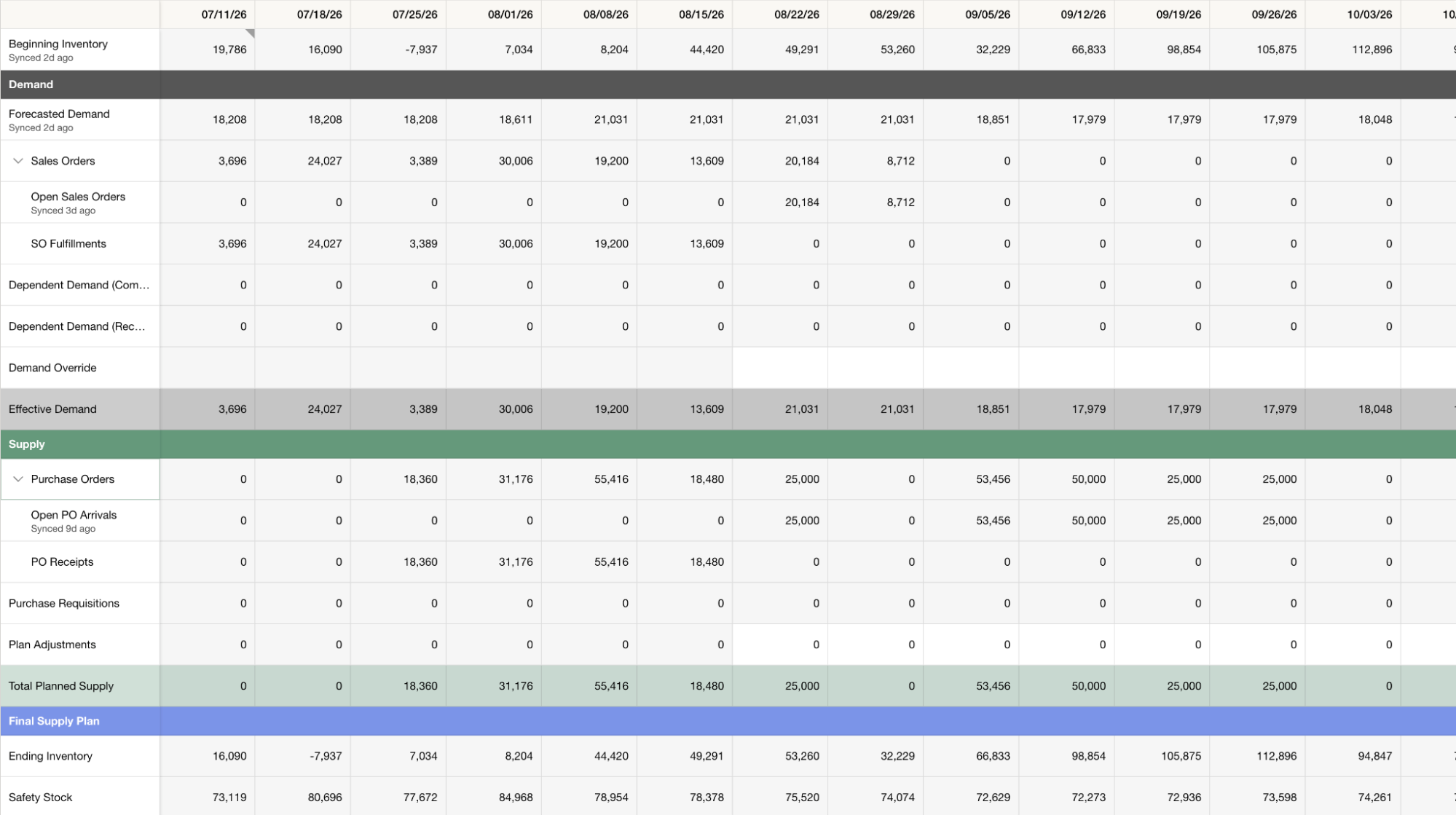
5. Fully shipped orders no longer vanish from Supply Planning - Orders that shipped in full but were never formally closed in the ERP were dropped entirely, so their shipments never appeared and shipment history ran far below reality. Fully shipped open orders are now kept with their shipped quantities.
6. Inventory rolls forward for products without a starting count - Products with no recorded starting inventory showed a grid that contradicted itself, where one week's ending inventory never carried into the next week's beginning. The workspace now rolls inventory forward from the first real value or movement, and weeks before that stay blank instead of showing a misleading zero.
7. The grid stops contradicting itself after a week ends - When a week ended between syncs, the workspace could show two different answers for the same week. Every view now applies the same week-rollover logic at read time, so finished weeks consistently show actuals.
8. PO and receipt syncs catch backdated changes - Edits to older purchase orders and backdated item receipts were invisible to the supply plan unless they happened to fall inside the sync's scan window. Both pulls now capture exactly what changed since the last run and honor deletions, so the plan tracks the ERP faithfully.
TPM
1. Filter accruals by GL account, with saved views - Slicing the Accruals list by GL account meant ticking every deduction type that rolled up to that account, or exporting to Excel. The list view now has a GL Account filter and column, and saved views work there like everywhere else.
2. Choose which trade reasons apply distributor markup - Distributor markup was hardcoded to MCB and Free-Fill promotions, with no way to use it on other trade reasons. A new toggle on the trade reasons settings table lets each reason opt in or out.
3. Trade calendar search now matches contract IDs - Searching the trade calendar by a contract ID returned nothing. Contract IDs are now searchable, case-insensitively and on partial matches, and the search placeholder spells out what you can search by.
4. Easier rate edits on split promos - Editing the rate on a split promotion was painful, especially for flat fee promos, where an edited amount would get overridden. The newly edited flat fee now splits across the lines as expected.
5. Short promos no longer drop trade spend in scenarios - A scenario promotion shorter than four days could round to zero weeks, and the page then dropped the promo and its fee from trade spend. Week counts now have a minimum of one and every view agrees.
6. Trade Summary exports no longer stall silently - Exports could hang forever showing Stale when a saved view referenced a forecast version that had since been renamed or retired. A request for a version that no longer exists now fails immediately with a clear error instead of hanging.
7. Overlapping lift units recalculate after promo uploads - Promotions created through upload skipped the overlapping lift calculation, so uploaded promos that overlapped others could carry wrong lift numbers. Uploaded promotions now update overlapping units the same way manually created ones do.
8. Booked accrual totals stay fixed - Editing a check or invoice date after an accrual version was booked could quietly move a deduction across the version's cutoff and change a total that was supposed to be locked. Booked versions now snapshot those dates at lock time.
Deductions & Cash Application
1. Default GL item for reasons with multiple mappings - When a deduction reason mapped to several GL items or accounts, the GL field stayed blank and users picked the same object by hand on every line, dozens of times per check. You can now star a default mapping per reason, and it auto-fills on the check page, the deduction page, and the deductions grid.
2. Improved bulk upload now available to everyone - The upgraded bulk PDF upload experience in Cash Manager was previously limited access. It is now available to all users and replaces the old upload option, one modern flow handling PDF, CSV, Excel, and zip files.
3. Sysco supplier portal checks now supported - Checks paid through the Sysco supplier portal could not be processed automatically, leaving that cash to be worked by hand. Confido now ingests Sysco supplier checks with the correct check number, date, and line detail.
4. Amazon shortage claims get reasons and PO numbers - Amazon check remittance lines landed with no dispute reason, and the CSV backup that arrives with most shortage-claim deductions was dropped. Shortage reasons are now stamped automatically and the CSV backup is parsed, so the PO number lands on the deduction.
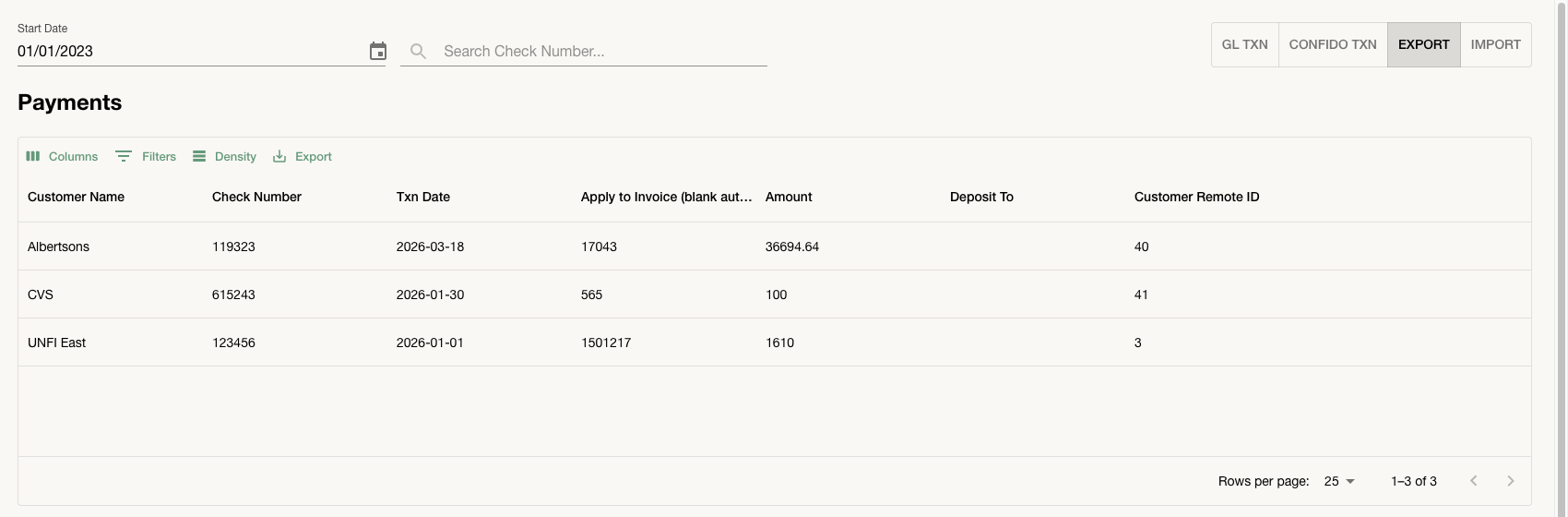
5. Customer remote ID added to the payment export - The payment export did not include the customer's remote ID, which made reconciling exported payments against your ERP records a manual lookup exercise. The export now carries a Customer Remote ID column in the grid and in the CSV and Excel downloads.
6. Much faster check saves - Saving a check with many line items and custom fields used to take 30 seconds or more. Those saves are now dramatically faster.
7. Clearing drawer no longer loses promo lines after Allocate - Allocating a deduction and then adding promos per line could get Save rejected with a totals mismatch, and reopening the drawer showed the allocation but none of the promos. The drawer now correctly tracks the lines Allocate creates, so saves go through and promo assignments stick.
8. Stale pinned views no longer crash the deductions tabs - Companies holding a view pinned before an older filter format change saw both Deductions and Deductions Reports crash on load, with no way to switch off the bad view. Stale views are now repaired automatically, and the same guard protects Clearing, Accruals, Shopper Marketing, Trade Calendar, and the Trade Rate Table.
9. Clearing errors now explain themselves - A clearing search that matched no rows returned an error instead of an empty list, and when clearing deductions failed the response came back with an empty message. Empty searches now simply show an empty queue, and real failure reasons come through intact.
10. Clearing page saves no longer fail on large accounts - Some teams could not save splits from the clearing page at all, getting only a generic failure, because each save bundled a large amount of unrelated reference data that tripped a size limit. Saves now send only the fields that matter, so splits and clears persist reliably.
11. Sysco billback backups create deductions again - Sysco began delivering billback backup documents as zip archives instead of single PDFs, and those files stopped turning into deductions. The pipeline now unpacks the archives and runs each PDF through the normal deduction flow.
12. Backup documents keep the right customer - Backup documents whose line items merely mentioned a product name resembling a retailer were being misfiled, creating deductions under the wrong customer. The fallback now keeps the correctly resolved customer.
13. Credit memo pushes to the ERP no longer fail on custom fields - Pushing a check with cleared deduction lines could get rejected by QuickBooks with a cryptic parse error, blocking the whole push, and part of the custom field data was silently wrong in NetSuite too. Custom fields on clearing lines now push correctly across QuickBooks, QBX, and NetSuite.
14. False error after allocating spreadsheet backups - After allocating a CSV or Excel deduction backup, saving the column mapping popped a permanent error even though the allocation had worked. The error is fixed, and background mapping memory now works for spreadsheet backups for the first time.
15. Bulk PDF zip uploads attach again - Bulk zip uploads of deduction backup PDFs had been silently doing nothing, since the process that unpacks them had stopped running. It is fixed, so zip uploads process again.
16. KeHE short-ship reasons no longer dropped - Some KeHE short-ship deductions came through labeled as PO Discrepancy with no reason attached, because several document layouts hid the details from the parser. Those layouts are now handled, so short-ship lines land with the correct reason.
Disputes
1. Email dispute submissions delivered reliably - Disputes submitted over email, including UNFI EPD and several audit firms, could look submitted without ever reaching the recipient. Email submission is fixed, any future delivery problem now shows a clear error on the dispute instead of failing silently, and our team is alerted immediately.
2. Manually uploaded proofs now unblock disputes - A dispute could sit stuck as Incomplete waiting on a proof-of-delivery document even after one had been uploaded manually, because the readiness check only saw documents pulled in automatically. Manually uploaded supporting documents now count toward completeness, so those disputes move forward.
3. Oversize supporting docs no longer strand Target disputes - A supporting document over Target's 10 MB attachment limit made the portal upload fail after the case was already created, leaving the dispute orphaned. Oversize PDFs are now split to fit before submission, and only files that genuinely cannot be fixed hold the dispute back with a clear reason.
4. UNFI resolution sheets match across checks - When a UNFI reply bundled verdicts for many checks, only the check tied to the dispute the email anchored on ever got resolved, so most verdicts were dropped. Matching now runs company-wide across confirmed disputes of that type, and past replies are re-read to recover missed resolutions.
5. Walmart deductions match to the right claim lines - Some Walmart deductions were losing behind-the-scenes details needed to tie them to the right claim lines, which could leave them looking unmatched. That information is now preserved, and previously affected deductions are being repaired.
6. Generated dispute messages no longer name individuals - Auto-generated dispute messages signed off with a specific person's name, which read oddly when the sender was really the team. Messages now greet the team, speak as we, and close without a personal signature.
Platform
1. Integrations page shows per-capability status - The Integrations page rolled each retailer connection into a single status, so a problem limited to disputes or freight documents was either invisible or looked like a full login failure. Each connection now shows separate statuses for deductions, disputes, and freight documents with clear messages under each row, a single banner for connection-wide failures, and a banner naming exactly which portal permission was refused.

2. Setup instructions stay available after a portal connects - For Confido-managed portal integrations like Kroger, Walmart, and Costco, the setup instructions were only reachable while the connection was still pending. The connected card's menu now includes a Setup instructions item that reopens the same dialog.
3. See when integrations run next and what is running now - The integrations page gave no hint whether a connection was about to pull data, mid-run, or waiting. Credential rows now show Running now, Queued, and when the next run is coming, with matching badges on the integration cards.
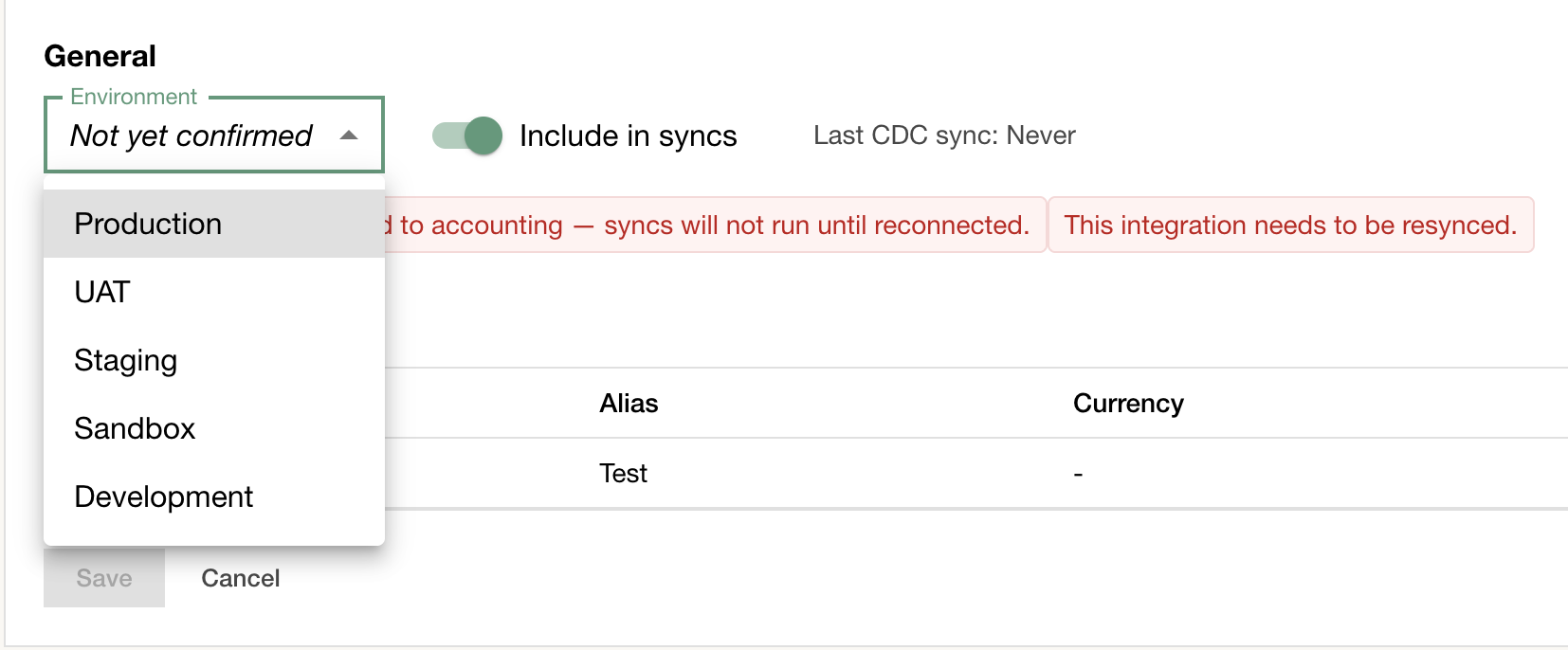
4. Environment labels for ERP connections - With multiple ERP connections it was hard to tell which one was production versus sandbox or testing. Each business system now shows an environment label on its row, settable from a new General section in its config panel, alongside a toggle to include or exclude the connection from syncs.
5. Remove a Confido Mapping, with a clear warning first - Adding a Confido Mapping to a customer was a one-way door: clearing the field just bounced Save with an error, and removing one silently meant some of that customer's data stopped rolling up with no warning. Clearing a mapping and saving now removes it, and the Directory warns you about the consequences before you unmap.
6. Fixed page crashes when report grids change columns - Switching things like the year on certain report pages could crash the grid, and on Sales Forecast and Accruals it took down the whole page. Grids now reload cleanly when their columns change.
7. Products CSV download matches on-screen filters - Downloading the Sellable Unit CSV ignored the lifecycle and case filters, so the file did not match what the table showed. The export now applies the same filters as the grid.
Change Log - Week of August 10, 2026
Forecasting & Demand Planning
1. Configurable promotional price-drop threshold - The price drop that marks a week as promotional when deriving base and incremental units was fixed at 10 percent, which did not fit every business. Admins can now set their own threshold on the sales actuals import settings page, and it flows through to every derivation run.
2. The alerts bell now summarizes by family instead of sampling - With more than a handful of active alerts, the notification bell showed an arbitrary four and hid the rest. Above four alerts it now shows one row per alert family with totals, critical counts, and newest age, and each row opens the triage page pre-filtered to that family. At four or fewer you still get the individual alerts with direct links.
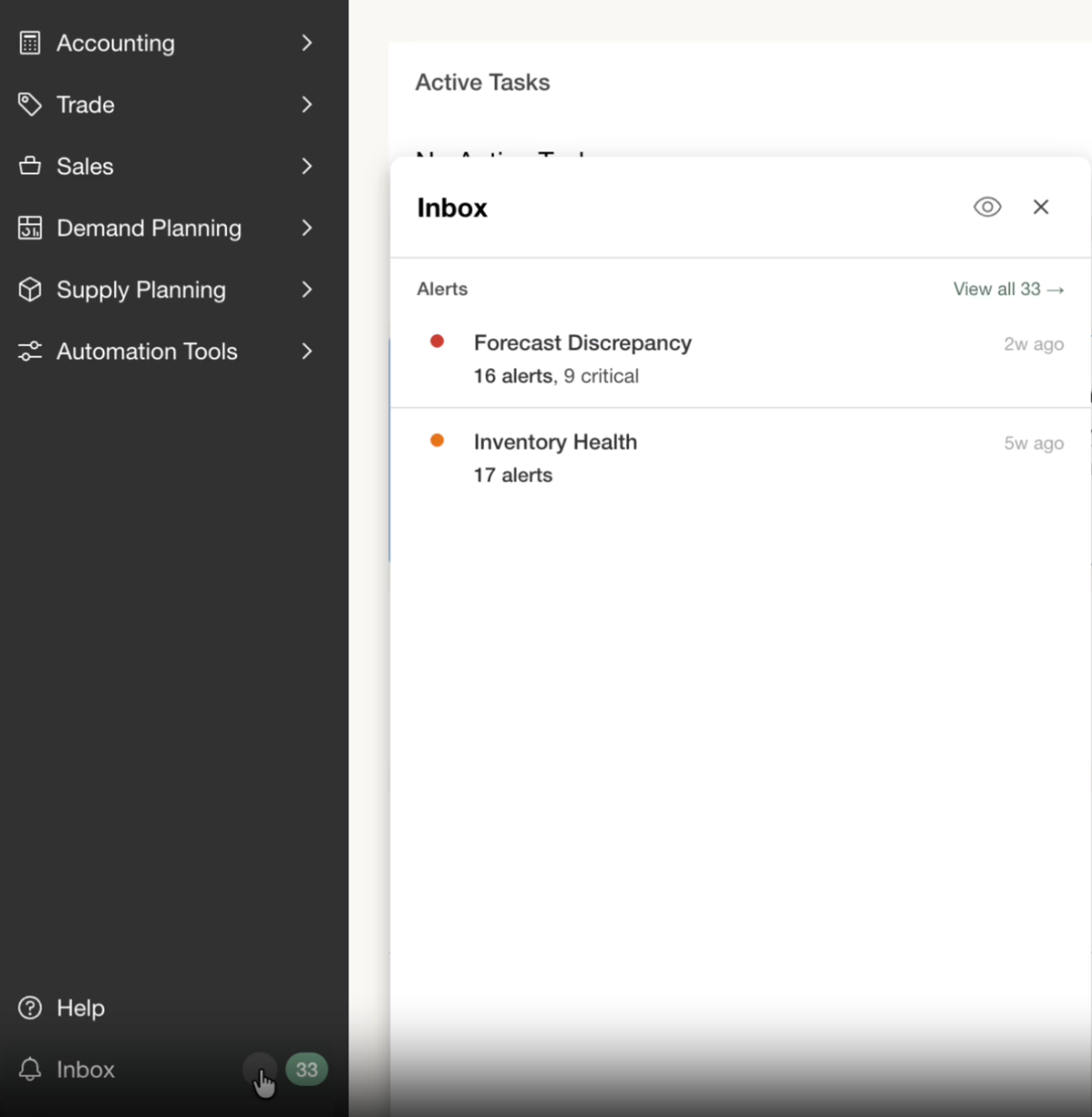
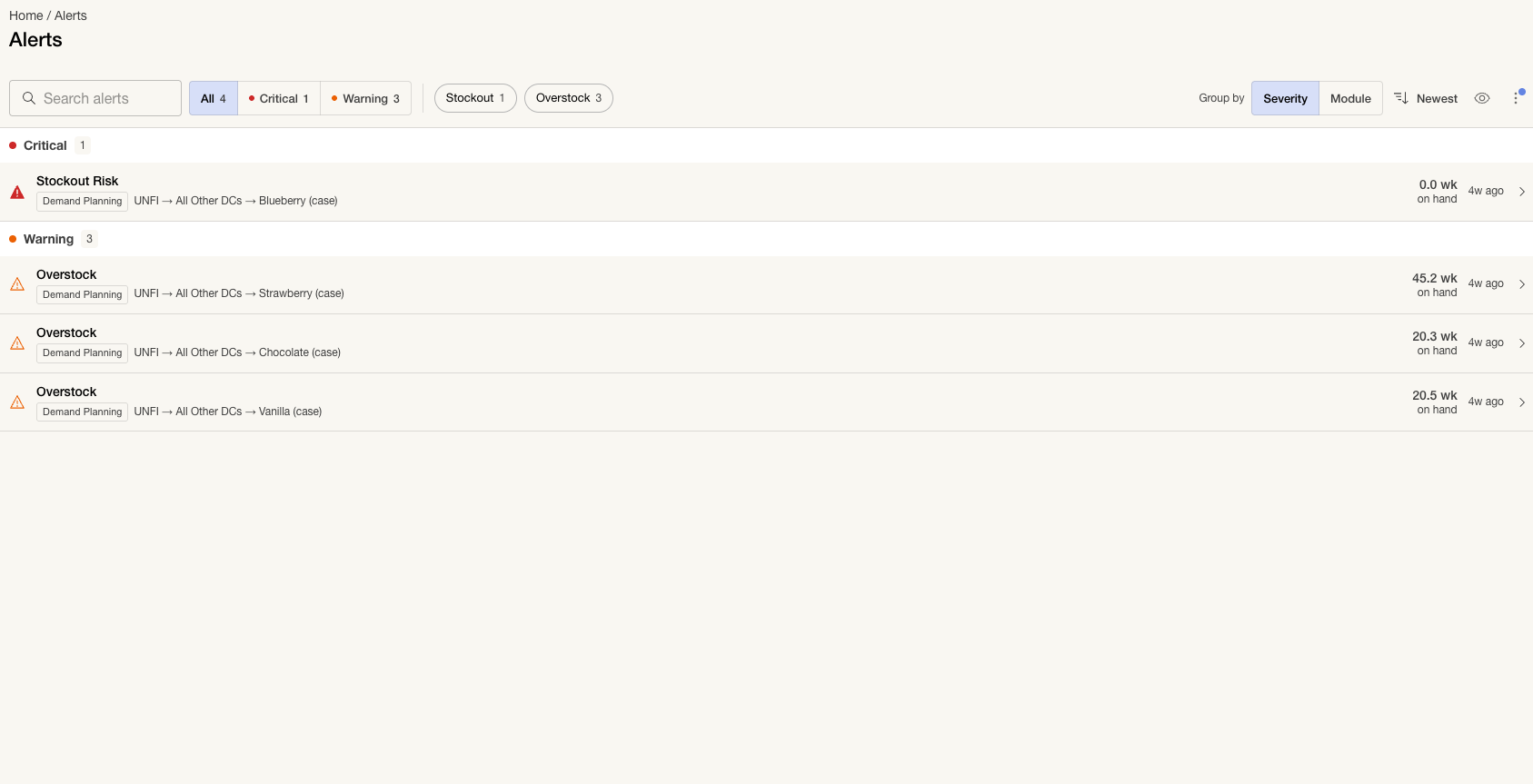
3. Cleaner alert triage filters and inbox controls - The alert triage bar had unlabeled twin toggles, a Clear button that reflowed the layout, and search that missed what the row actually said. Filters and view controls now sit in separate zones, sort collapsed into one flip button, and search matches the visible type label, so finding the alert you want takes less fiddling.
4. Much faster growth factor rollbacks - Rolling back a growth factor applied to many forecasts wrote each forecast one at a time, so large rollbacks could take over 80 seconds. The writes are now batched, cutting the largest measured rollback from about 80 seconds to under 12. Change history still records the true previous values.
5. Ship-to forecast data now refreshes itself - Edits made through promotions, shipper events, opportunities, and similar indirect changes could sit stale in ship-to views until someone triggered a refresh by hand. A recurring background refresh now drains pending changes every 15 minutes, so ship-to views stay current on their own.
6. No more duplicate ship-to forecast rows after delay changes - Changing a buy-in or delivery delay setting could quietly leave behind duplicate ship-to forecast rows for the same consumption period, inflating exported and reported forecast numbers. The system now cleans up the outdated rows whenever delays shift, so each period keeps exactly one correct record.
7. Stale depletion recommendations no longer appear - Recommendations on the depletions tab could show up for periods that were already actualized, and they could not be actioned or dismissed, so they just sat there. Recommendations are no longer generated from actualized periods, which clears out those stuck suggestions.
8. Clear error when depletion uploads have a unit mismatch - When an uploaded depletion actuals file used a unit of measure the product did not support, the rows silently never showed up in the depletion forecast. The upload now stops with a clear error describing the mismatch so it can be fixed on the spot.
9. Opportunity pipefills follow route-to-market changes - After a route-to-market change, opportunity pipefill volumes kept flowing to the old planning group instead of the new one. Pipefills now refresh when a planning group changes, so they stay aligned with your current route to market.
10. Failed product creates no longer break the workspace - A product create that was rejected for a linked-item conflict could quietly leave behind a nameless product, and a single such product took the entire Demand Planning workspace down for the company. Failed creates now roll back completely, and the workspace skips any product without a resolvable name instead of erroring for everyone.
Supply Planning
11. Order rows split planned from actual, with drilldown - Sales Orders and Purchase Orders in the Supply Planning workspace mixed planned and shipped quantities into one number that jumped around as shipments posted. They are now collapsible group rows: past weeks show only what actually shipped or arrived, current and future weeks combine open plus actuals, and you can expand each row to see the detail. Weekly totals stay steady while quantity simply reclassifies from planned to happened.
12. See your ERP fulfillment and receipt data in Data Ingestion - Fulfillment and receipt data pulled from your ERP was only inspectable by Confido engineers. The Supply Planning Data Ingestion page now has read-only Fulfillments and Receipts tabs, paginated and ordered newest first, placed right after the order lanes they derive from.
13. Supply plans stay anchored to your latest inventory snapshot - A supply plan's actualization date did not move with the data, so plans could sit anchored to a stale point even after fresh inventory arrived. Each data sync now aligns the plan to the most recent inventory snapshot date and only advances when every sync step succeeds, so a failed sync never leaves the plan half updated.
14. Sync runs show which version they apply to - When a company has multiple Supply Planning versions, a sync run only applies to one of them, but the screen never said which. The sync modal and the sync history drawer now label each run with its version, so there is no guessing about what actually got updated.
Disputes
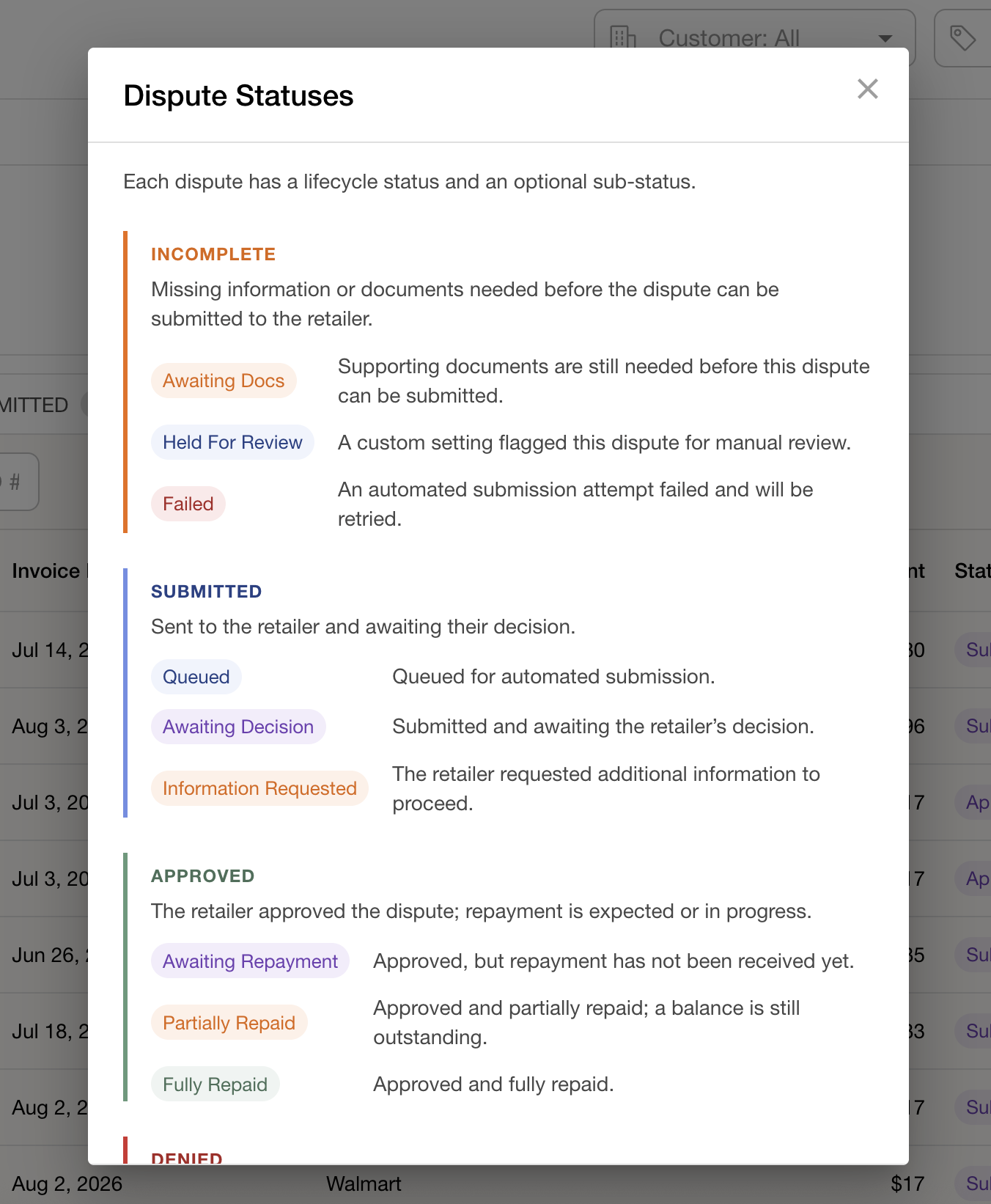
15. Plain-language dispute status definitions - Dispute statuses and sub-statuses were shorthand users had to interpret on their own. An info icon next to the disputes status tabs now opens a modal explaining every status and sub-status in plain language, so it is clear why a dispute sits where it does.
16. Dispute CSV exports finish in less than half the time - Exporting disputes to CSV went through the full dashboard pipeline, computing fields the file never includes. A dedicated export path now builds only the columns that end up in the file, cutting a six-month export from about 2.5 seconds to about 1 second with identical output.
17. Manual Target compliance disputes no longer blocked - Manual submissions of Target compliance disputes were being blocked when they lacked backup documentation that is only required for auto-disputes. Manual submissions no longer require that backup and now fall back to the deduction's own PO number, so valid disputes go through.
18. Recovered disputes no longer show stale failures - A dispute that failed to submit once and then succeeded kept its old failure state, so recovered disputes still read as failing. A successful submission now clears the stale failure while genuinely unrelated issues stay flagged.
Deductions & Cash Application
19. Clearing journal dates follow each subsidiary's local timezone - Automatically generated clearing journal dates used the server's UTC calendar, so entries created in the evening could land on the wrong day for US customers. Each subsidiary now carries a business timezone, defaulting to US Eastern, and journal dates follow that local calendar. Historical journal dates are untouched.
20. Stopped duplicate SuperValu check remits - When the SuperValu portal re-served a remittance it had already sent, a fresh copy of the check was created every time, cluttering the Deductions view with duplicates. Ingestion now recognizes remittances that already arrived and skips them, while still keeping legitimate multi-part checks. A replay of the past year found 251 duplicate copies this would have blocked.
21. Import CSV button now says why it is disabled - When the Import CSV option in Cash Manager was greyed out, there was no way to tell whether the importer was still loading or had failed, and a failed load left it dead with no message. The disabled button now shows a tooltip explaining its state, failures surface properly, and the importer opens against the right template for the tab you are on.
22. Images pasted into remittance emails are now captured - When a customer's remittance email had payment details pasted in as an image, the generated document dropped or shrank the image to a tiny icon and extraction found no payment fields. Pasted images are now embedded at full resolution, so every field in the image makes it into the document and gets read correctly.
23. Clear error message when saving an already-cleared deduction - Splitting a deduction that had already been cleared elsewhere failed with a bare "Failed to save" and nothing persisted, leaving users stuck with no idea why. The save now returns a readable message telling you the deduction is already cleared and to refresh, so you can unblock yourself immediately.
24. Kroger netting payments now prorate terms discounts - Partial Kroger netting payments were being hit with the invoice's entire terms discount, badly overstating the deduction on small payments. Discounts are now prorated to the payment amount, so a small payment receives a proportional share instead of the full discount.
25. Cash Manager no longer counts excluded integrations - Cash Manager's last-updated timestamp and accounting-systems list were still counting integrations you had excluded from syncs, which made data freshness look wrong. Those excluded connections are now ignored, so the display reflects only the systems actually syncing.
26. Failed check pushes now show the real ERP error - When a Re-Pay or Pre-Pay check push to the ERP failed, the notification showed a confusing internal error instead of the actual reason. The real ERP error message, such as a duplicate document number, now comes through so you can see what went wrong and fix it right away.
27. Checks no longer get stuck in Pushing - Submitting a check to the ERP could leave it stuck showing a pushing state indefinitely if the background job was interrupted mid-push. The push is now split into a quick submit plus a status poll with retries and a hard timeout, so every push either completes or fails cleanly without double-submitting.
28. Clear warning when a sender email conflicts with a Confido-managed address - Adding an AR sender email that Confido's managed registry already covered could silently route those emails down the wrong processing path. Saving such an address is now blocked with a clear message naming the conflict, so misrouted email is prevented at setup rather than discovered later.
TPM
29. Supporting docs carry over when copying forecast versions - Copying a forecast version brought the promotions along but left their supporting documents behind, so contracts and attachments had to be reattached by hand. Supporting docs now carry forward automatically whenever a new forecast version is created.
30. Net sales exports now identify the source record type on every row - Rows in the net sales data export carried a source record id without always saying what kind of record it pointed to, which made lineage tracing guesswork. Every exported row with a record id now includes its record type, covering invoice revenue, promotion spend and accruals, and shopper marketing rows.
31. Promotion pages load several seconds faster - Large promotion tables and the similar promotions view both spent seconds rebuilding the same formatting and currency data on every load, with the biggest accounts waiting close to nine seconds. That work now runs once through a faster shared path with identical output, saving multiple seconds on promotion-heavy accounts.
32. Scenario-generated promotions accrue correctly - Promotions created by merging a Scenario came out with incomplete accrual setup, so they had no period to accrue and could be missed in trade summaries. Generated promotions now get the right accrual period and show the correct non-accrued status according to your accrual methodology settings.
33. Promo product tagging no longer tripped up by deleted products - Some customers saw product custom attribute assignments fail to stick to promotions, with spend reverting after an apparently successful save, because deleted products made validation think the product set was incomplete. Validation now only considers active products, so these promos save and hold their values correctly.
34. Overlapping lift now counts scanback periods - Lift that landed inside a promotion's scanback window was left out of overlapping lift, understating overlap between promos. The lift engine now includes the scanback date range, so promo spend that depends on overlapping lift is calculated correctly.
35. Overlapping lift no longer briefly zeroes out on promo save - Saving a promotion reset overlapping lift to zero until a background job restored it, so promo spend looked wrong right after saving. The value shown on screen is now kept when the promo saves, while the background job still verifies it afterwards, so spend no longer jumps around after hitting save.
36. Promo units refresh when new forecast rows are created - Customers who loaded their trade calendar before populating forecasts saw stale or zero-unit promotion items, because promo units only recalculated when existing forecasts changed. Promotion units now refresh automatically whenever new forecast rows are created, so trade calendars stay accurate without a manual refresh.
37. Promotion performance loads with dateless promotions - Opening promotion performance could fail with an error when a promotion item had no start or end date. Cost matching now skips those items cleanly, so the page loads.
38. COGS uploads and edit dialog behave correctly with blank values - Blank dollar cells in a COGS upload were silently saved as $0, and a background refresh while the edit dialog was open could wipe its state and leave the save button dead. Blank rows are no longer written as $0, the dialog keeps its state through refreshes, and a legitimate $0 value is no longer treated as empty.
Platform
39. Integrations page loads about twice as fast - The integrations status page ran hundreds of database queries to build its cards, so it could take up to seven seconds to load. Lookups are now preloaded and batched, roughly halving load time with identical page content.
40. Faster custom field settings saves - Saving custom field settings fired thousands of database statements, one per field and mapping, so saves on large field sets could take 7 to 9 seconds. The save now batches that work into a handful of queries, making settings saves dramatically faster while keeping the full change history intact.
41. Faster loads for cached reporting data - Reporting pages were re-doing an expensive data conversion on every load, even when the data was already cached, adding as much as 929ms per request on large deduction reports. That work now happens once when the cache is filled instead of on every read, so repeat visits to reporting views come back noticeably faster.
42. Custom report previews load on non-default intervals - Previewing a custom report with opportunities shown on a quarterly or other non-default interval could fail with an error instead of rendering. The mismatch behind the failure is fixed, so those previews now load and the opportunity math runs as intended.